Woodland beatdown
Posted on June 3, 2019 • 6 minutes • 1229 words • GitHub
Table of contents
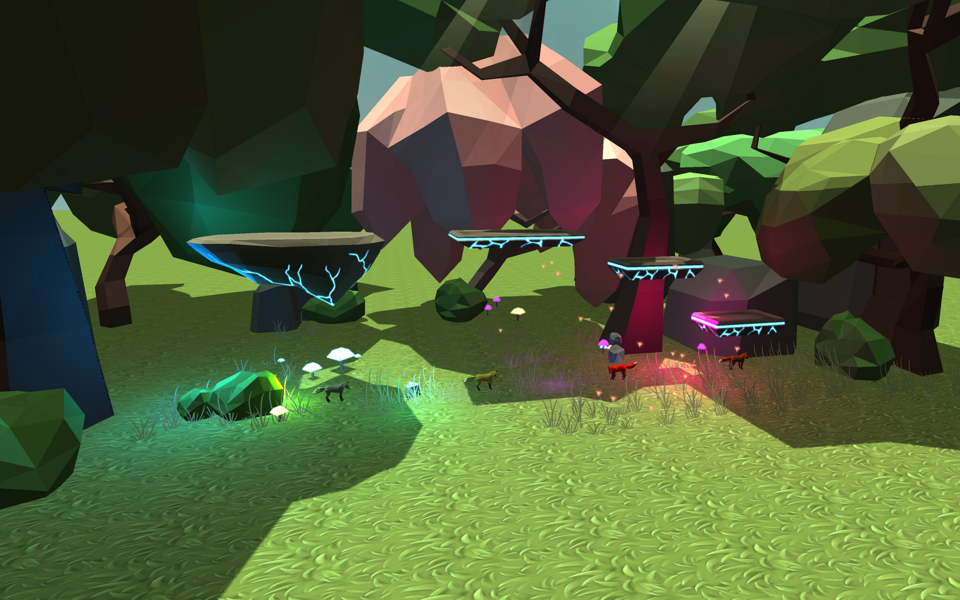
In this project we were 6 people in total and were tasked to create a game with DirectX 11 and C++. We landed on animal fighter with a gun-game mechanic. Each time you defeat an opponent you switch to the next animal. Having the last animal and defeating someone makes you the winner. We had our own group room where we could meet and work together and plan the game and choose what each member should do.
I chose four different techniques to implement into the game engine. Deferred rendering with light volumes, glow effect, shadow mapping, and back to front rendering with transparent objects. I first implemented a forward renderer so others could test their techniques and the game. Deferred rendering is a different way of rendering opposite to forward rendering when all the objects are rendered directly to the back buffer. Instead in deferred rendering we split the rendering in two steps where the first step is to render to a g-buffer that contains different textures each containing data for the object. The second step renders each light using light volumes and using the data from the g-buffer to draw the pixel.
Tools:
- C++
- DirectX11
- Visual Studio
- RenderDoc
- Particle system
- git (source control)
- HacknPlan (task tracking)
Deferred rendering
The first step is to create the G-buffer which holds the different textures. In my implementation it has four textures which are both render targets and also shader resources for the second step. Render to these four textures with normal color, world position, texture color and glow map color. Below is an image captured with renderdoc displaying each texture.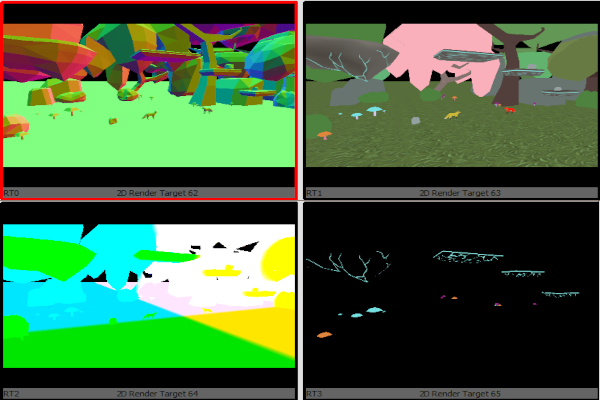
After these textures are rendered they can be used as shader resources for the light part. Each point light is rendered using a sphere model which is scaled by the radius of the light and direction light is rendered using a fullscreen quad. The light part has two passes, one where it only renders front faces and writes to the stencil texture for every visible pixel and the second where it uses the stencil and depth texture to render the pixels inside the sphere.
An issue is rendering transparent objects. It is impossible with deferred rendering so to solve this I added an extra array which contains the transparent objects and then use forward rendering after the deferred part. Another issue was the performance of the game. In testing it showed that forward rendering was faster than deferred rendering. (I think the amount of lights used in the game wasn’t enough to gain the benefits of using deferred rendering.)
An upgrade to this implementation would be to use a third part resulting in three parts. This method is called deferred lighting or light pre-pass and is broadly used in modern engines. This also solves the issue with only having one material in deferred rendering.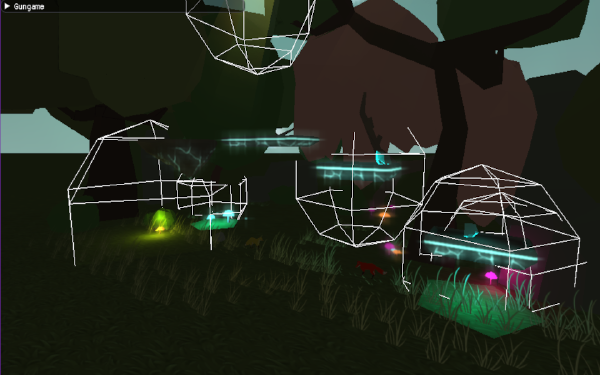
Shadow mapping
This method will render the models from the perspective of the light and then use this z-buffer when rendering to the scene. Updating the z-buffer only requires the vertex shader to be set in the pipeline so no pixel shader is needed. To render from the light, the view matrix uses the light direction and position and for the projection matrix an ortho matrix is used because the light is directional (sun) and will have the same direction for every light ray. When rendering the scene we use the model in world space and multiply it by these two martices and check if the z-coordinate is lower than the z-buffer. If it is then the pixel is in shadow.
Some known issues with shadow mapping that came up while developing are shadow acne, peter panning, and overshadowing. Shadow acne is when the pixel is determined to be in shadow when it is not. This was solved by using a bias and subtracting the z-cordinate with this bias. Peter panning becomes a problem when the bias is set to high. This will detach the shadows from the object and will make it appear floating. To solve this we can tighten the far and near plane for the scene but keep the models in the shadow map. I solved it by testing different values for the far and near plane to get the best values. Overshadowing is when the scene is huge and the shadow map doesn’t cover the whole scene. The outside of the shadow map will be shaded and to fix this a clamp sample is used when sampling the z-buffer and then check if the models z-coordninate is bigger than 1.
Another issue with this implementation is transparent objects. In this game we had grass models which were quads with grass textures and the shadow became a rectangle. Because of this we decided to remove transparent objects from being rendered in the shadow map. One more issue that didn’t effect this project was moving the light camera with the player camera. In our game with fixed camera the shadow map can be configured to render the whole scene and not move the light camera. With a first person shooter for example where the player moves alot and to new location the light camera needs to follow the player camera.
Glow map and back to front
I also created the glow post processing which uses a horizontal and vertical gaussian blur with vertex and pixel shader. This was used for moving platforms and glowing mushrooms in the background. It takes the glow map from the g-buffer and calculates the texture coordinates in the vertex shader and then uses them in the pixel shader to sample the neighbours and adding them together to create the blurred pixel. This is first done horizontally and then verticaly in a second pass. The blurred texture is then used in the light shader and only added when rendering the directional light.
Back to front rendering is used to render transparent objects. A selection sort is used on the array of transparent objects and then each object in that array is rendered. The objects are sorted using the distance from the camera to the object. While developing the game this function used a lot of the CPU time so my first solution was to execute it every 30th frame. This was a bad idea because it would lag the game every 30th frame which was worse than having a constant bad framerate. With more important tasks and no other solution and the deadline approached we decided to not order the objects and to keep the function but not executing it for later use and optimization.
Reflection
This was the first game project using DirectX11 so it was a good learning experience. Using the Visual Studio Graphics Debugger was a huge help when creating the different techniques and creating my first game engine with models and textures. It also taught me that different solutions are perfect for our game but might not be good in another game. For example the deferred renderer might have been good in a big scene with lots of lights but in our game a forward renderer is sufficient enough. Being my first group game project, it taught me how valuable a clear plan is and also having good communication with eachother. If there were more time I would like to improve the transparent rendering by using order independent transparency and also to sort using BSP trees.